> For the complete documentation index, see [llms.txt](https://docs.ready.co/llms.txt). Markdown versions of documentation pages are available by appending `.md` to page URLs; this page is available as [Markdown](https://docs.ready.co/ready-wallets/web-wallet/key-management.md).
# Key Management
### Architecture
#### Guardian
The Web Wallet is a smart-account wallet, with the Ready Backend acting as a co-signer/guardian. The account is secured by 2 keys: the Signer Key and Guardian Key. The security model requires both signer and guardian signatures to submit a valid transaction (except for recovery-related actions, where one signer is enough).
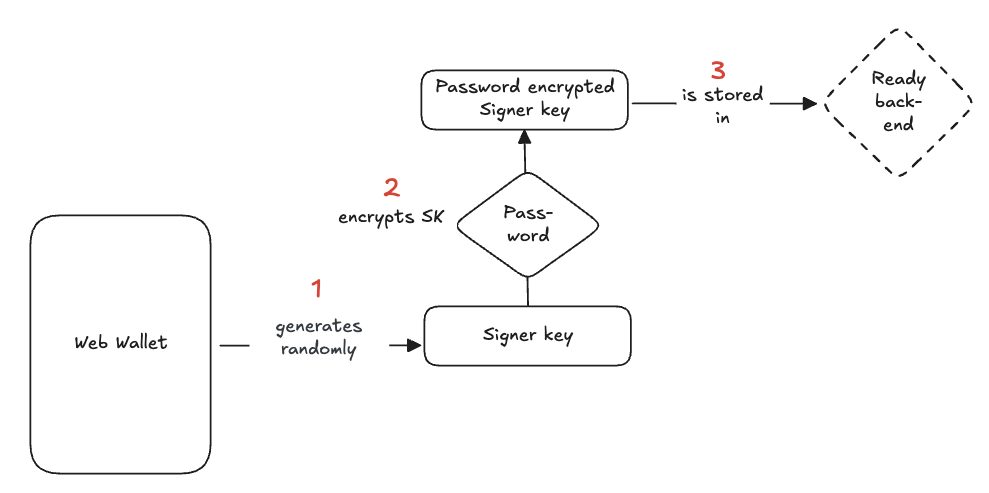
The Guardian Key is stored in the Ready backend while the Signer Key is **encrypted** and stored in the Ready backend in two different versions: password-encrypted and device-encrypted.
#### Password-encrypted Signer Key
When a user creates a new Web Wallet account, a signer key is randomly generated, encrypted by the user’s password, and securely stored in Ready's backend.
{% hint style="info" %}
At no point, does Ready have access to an unencrypted form of the signer key (thus making it a proper self-custodial wallet).
{% endhint %}
#### Signing transactions
In order to sign a transaction, the users needs to:
1. Authenticate with Ready's backend through a password-less flow to retrieve the password encrypted signer key
1. The user is asked to input his email address
2. They receive an email with a 6-digit verification code
3. If the correct verification code is inputted, the user is successfully authenticated.
2. Decrypt the password-encrypted signer key with their password
{% hint style="info" %}
To avoid users having to input their password for every transaction, every time a user inputs their password and decrypts their Signer Key at login or to sign a transaction, the key will be re-encrypted with an ephemeral key and stored in the Ready backend.
If the user needs to sign a transaction within 5 minutes time frame, this encrypted key will be fetched from the backend and decrypted locally with the ephemeral key.
{% endhint %}
#### Device-encrypted Signer Key
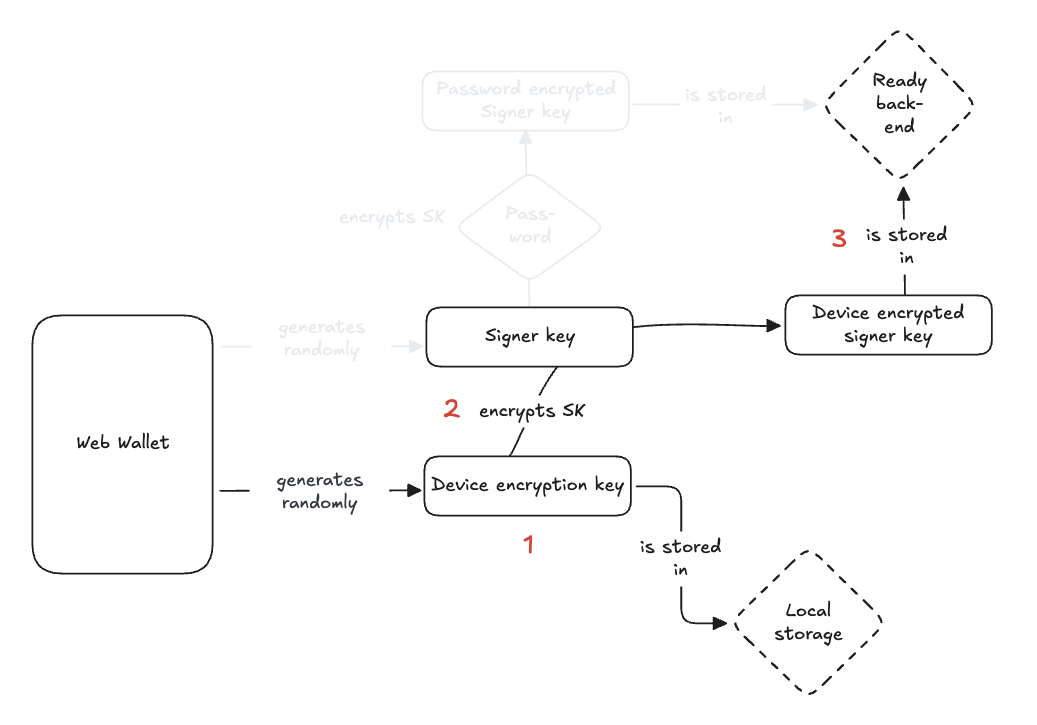
In addition to the password-encrypted Signer Key, a device-encrypted signer key used for recovery is also generated and stored in the Ready backend:
1. Web wallet generates a device encryption key that is stored in the browser local storage
2. The device encryption key is used to encrypt the signer key
3. The device-encrypted signer key is stored in the Ready backend
So, the Ready Backend holds two versions of the signer private key: one encrypted with the password and another encrypted with the device key.
### Recovery
Two recovery mechanisms are in place in case the user forgets their password:
* Offchain recovery: uses the device-encrypted or password-encrypted Signer Key
* Onchain recovery: relies on the smart account security model, i.e. the Guardian Key is able to trigger a recovery (with a time lock)
#### Offchain recovery
**Scenario 1: the user forgot their password but still have access to a trusted device**
In this case, the user can still authenticate with the Ready backend using their email address and retrieve their device-encrypted signer key which can, in turn, be decrypted using the device encryption key stored in the local storage.
**Scenario 2: the user still have their password but lost access to their device**
In this case, the user can authenticate with the Ready backend using their email address on a new device (browser), retrieve the password-encrypted signer key and decrypt it with their password.
**Scenario 3: the user have lost both their password and trusted device**
*See onchain recovery*
{% hint style="info" %}
Additionally, users can choose to back-up (export) their private key and use it for offchain recovery.
{% endhint %}
#### Onchain recovery
The on-chain recovery is a process at the blockchain level, where the account’s guardian is allowed to replace the account’s signer. The user will generate a new signer key and encrypt it with a new password.
1. The user authenticates with Ready using the email-based passwordless flow and requests an onchain recovery
2. This triggers a 7-days timelock where the user will regularly receive emails informing them that a recovery has been started. If they did not initiate that recovery themselves, they can halt it.
3. After 7 days, the signer will be replaced, and the user will receive a confirmation email letting them know they can now use their account.
#### Guardian removal
If they wish to remove the guardian, users can trigger an escape mechanism that will remove the guardian after a timelock of minimum 7 days.
{% hint style="info" %}
The timelock, or security period, gives users time to react if an attacker is attempting to remove the guardian
{% endhint %}